
Mondiad MCP Connector: How to Manage Ad Campaigns with AI

Running paid traffic usually means living inside dashboards: you check spend, filter by country, compare creatives, pause what isn’t working and clone what is. Most of that time goes into finding the data, not into deciding what to do with it.
With the Mondiad MCP connector, you can manage ad campaigns with AI instead. Your assistant reads your real campaign data and acts on it when you ask. Mondiad offers it as a free connector for both advertisers and publishers.
What Is MCP and Why Does It Matter for Media Buying?
MCP stands for Model Context Protocol, an open standard Anthropic launched in late 2024. It gives AI assistants a common way to connect to external tools and work with real data instead of only what they learned in training.

When an ad platform runs an MCP server, your assistant can read and act on your account through it. You ask in plain language, the assistant calls the right tool, gets the numbers and answers you in the same chat.
For a deeper look at the protocol itself, read our guide on MCP servers and affiliate marketing.
What Can You Do with the Mondiad MCP Connector?
For advertisers, the connector works like a teammate with access to your account. You can ask it to:
-
generate reports on spend, clicks, conversions and CPA
-
list campaigns by status or country
-
check campaign settings and targeting
-
clone or modify a campaign
-
manage ads and creatives
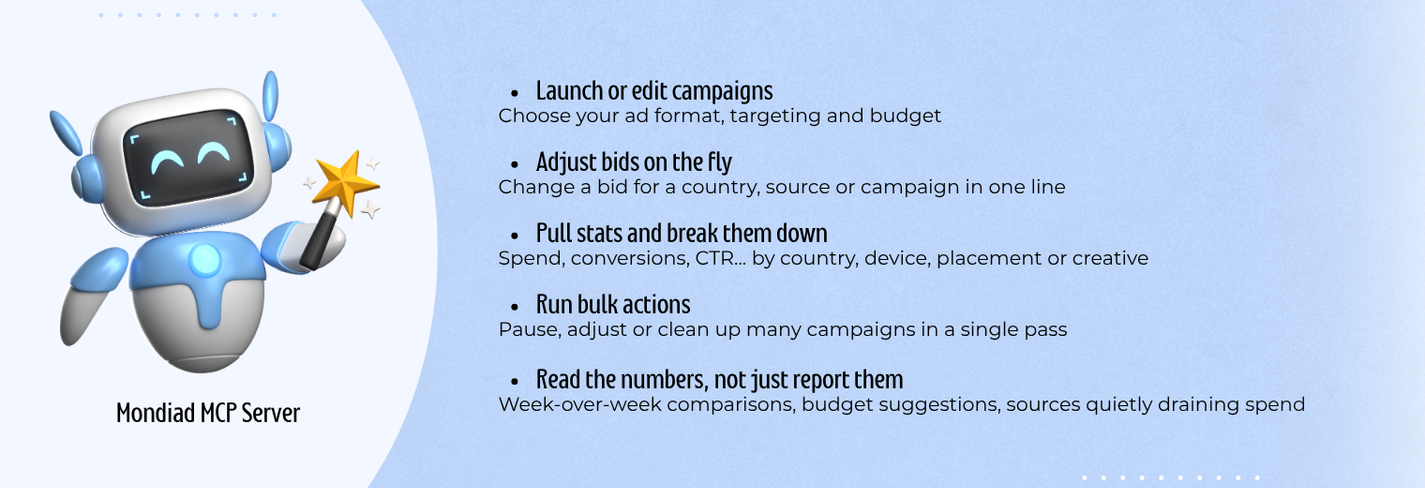
For publishers, it turns your stats into a conversation: revenue, ad zones and formats, without dashboard hopping.
Mondiad at a Glance
Mondiad is a self-serve ad network running since 2019, built by the team behind PopCash. Advertisers buy traffic and publishers monetize it, and the MCP connector works for both.
For advertisers: 8+ ad formats (including push, native, popunder and Telegram Mini App ads), 10B+ daily impressions worldwide and targeting down to OS version, carrier and city, plus smart optimization rules and TargetCPA. You can check rates and volumes by country in the traffic inventory.
For publishers: no minimum traffic, manual site approval in under 1 hour during working hours and a $10 minimum cashout.
How to Set Up the Mondiad MCP Connector
Setup takes a few minutes. You generate an API key in your Mondiad account (or create one if you’re new), then add Mondiad as a custom connector in Claude, ChatGPT or Cursor. For the exact settings and screenshots, follow the step-by-step Mondiad MCP connector guide.

Mondiad MCP Connector Prompts You Can Use from Day One
Here’s what AI campaign management looks like in practice. The numbers are examples, so set your own thresholds.
Prompts for Advertisers
1. Morning check
Show me all my active campaigns. For each one, show spend, conversions and CPA for yesterday compared to the day before. Flag any campaign where CPA went up by more than 20%.
You get a short list of what needs attention instead of scrolling through every campaign.
2. Segment hunt
For the [name] campaign, break down yesterday’s performance by country, OS and device. Show me the segments that spent money without converting.
Get the breakdown first, then decide what to blacklist or where to lower the bid. If you run mobile traffic, add carriers too. Once you know which zones convert, you can build a whitelist from your best push and pop zones.
3. Creative check
Show me the creatives in my active campaigns with CTR and conversions for the last 7 days compared to the previous 7 days. Which ones are declining?
Spotting fatigue early means you replace a creative while it still works, not after it has burned budget.
4. Expanding to a new GEO
Clone the [name] campaign and change the targeting to [country]. Keep the same creatives, set the status to paused and show me the full configuration before I activate it.
5. Weekly budget review
Compare this week to last week for all my campaigns. Which campaigns, countries and formats should get more budget and which are quietly losing money? Explain your reasoning.
Don’t skip the last line. Asking for the reasoning shows you which numbers the assistant used, so you can check the logic before you move budget.
Prompts for Publishers
1. Daily revenue
What was my revenue yesterday? Compare it with the same day last week and break it down by website.
2. Underperforming zones
Which ad zone is underperforming this week? Show me impressions, eCPM and revenue for each zone compared to last week.
3. Format comparison
For [website], compare my ad formats by eCPM and revenue over the last 7 days. Which one should get the best placement?
Revenue on Mondiad depends on active campaigns, traffic quality, visitor country and niche, so these checks are most useful once your traffic has run for a few days. To see what drives those differences, read why some publisher traffic is worth more than others.
Rules for Using the Mondiad MCP Connector on a Live Ad Account
1. Start with Reports
Use the connector only for reports and analysis at first. Once you’ve checked that the numbers match your dashboard, move on to changes.
2. Preview Before You Change
Always ask the assistant to show you the configuration before it updates or activates a campaign. New or cloned campaigns should start paused.
3. Know the Limits
The Mondiad MCP connector can’t:
-
add funds to your account
-
permanently delete campaigns or creatives (it only changes their status)
-
access billing data, except for your current balance
Pairing Mondiad with Dexodata for Cross-GEO Campaigns
Once the connector shows which countries and segments to scale, the next step is outside the dashboard: see how your ad and landing page render in a given location, run account checks from the right region, or automate that verification across many GEOs.
Dexodata is a proxy ecosystem for this work, that provides residential, mobile and datacenter proxies with geotargeting down to country, region, city and provider level, flexible rotation for both manual checks and automated sweeps, and an API to fold verification into your routines.
It runs on Pay-As-You-Go pricing on a tokenized balance, with a built-in firewall for domain allowlists and blocklists, and every IP is obtained with user consent. New users get a free $1 balance and a 25% bonus on their first deposit (up to $50) to test it against their own GEOs.
Get Started with the Mondiad MCP Connector
Once connected, most of your daily checks happen in a chat window and your time goes into decisions instead of filters.
Whether you buy traffic or monetize it, you can connect your account today. Advertisers can start with a $50 minimum deposit, and publishers get a 100% revenue-share bonus in their first 20 days.


